

Best GPS Dash Cams
🏆 Top Picks at a Glance
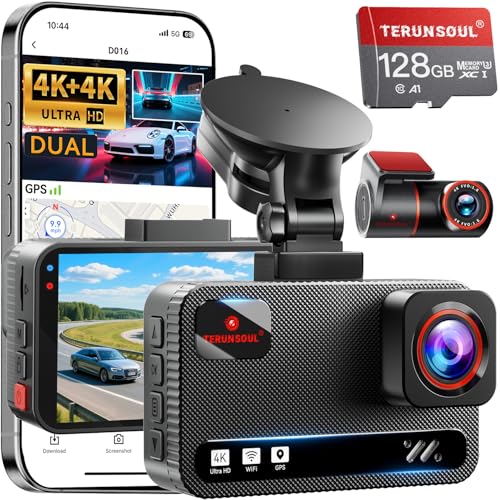 #1
#1
Best Overall
TERUNSOUl 4K+4K Dash Cam Front and Rear, Free 128GB Card Included, 5.8GHz WiFi Dash Camera for Cars, Built-in GPS, G-Sensor, 170°Wide Angle, 3" IPS Screen, 24H Parking Mode, Support 512GB Max
$129.99
Check Price → #2
#2
Runner Up
REDTIGER 4K Dash Cam Front Rear, STARVIS 2 Sensor, Free Card Included, 5.8GHz WiFi-20MB/s Fast Download, Dash Camera for Cars with GPS, WDR Night Vision, 170°Wide Angle, 24H Parking Mode(F7NP)
$129.99
Check Price → #3
#3
Best Value
ROVE R2-4K DUAL Dash Cam Front and Rear, STARVIS 2 Sensor, FREE 128GB Card Included, 5G WiFi - up to 20MB/s Fastest Download Speed with App, 4K 2160P/FHD Dash Camera for Cars, 3" IPS, 24H Parking Mode
$129.99
Check Price →Our Top Picks
Affiliate disclosure: if you buy through these links, we may earn a commission at no extra cost to you.
Factors to Consider
Video quality, night vision, and dynamic range
⚡ Quick Answer
Video quality is more than the resolution; sensor size, HDR, and bitrate determine what you actually get in glare or at night. In real-world footage, cameras with good HDR/WDR handle high-contrast scenes and preserve plate detail better than most entry-level 1080p units. 4K setups demand larger storage and higher performance microSD cards—most users should budget 128–256GB (U3/V30 or better) for a comfortable buffer. A strong app is essential for quick review of night clips and sharing, and parking mode performance hinges on pre-event buffering and power management so footage isn’t lost while parked.
Table of Contents
Reliability and build quality
Reliability starts with solid build quality, thermal design, and a robust power path for parking mode. Choose cameras from reputable brands that demonstrate consistent loop recording and overheating protection in real-world heat. For storage, rely on high-end microSD cards (SanDisk, Samsung) rated U3/V30 and plan 128–256GB for 4K or 2-channel setups; low-quality cards are a common source of footage corruption. Parking mode reliability hinges on a proper hardwire kit and power management; without a steady supply you may miss events.
Installation ease and power options
Most installations can be done with basic tools, but dual-channel systems add cable routing to the rear window and trunk area. For reliable parking mode, use a proper hardwire kit or fused power interface rather than a simple cigarette lighter adapter, so the camera can stay powered after you shut off the vehicle. Look for kits with bundled mounting hardware and clear wiring guides; a tidy install reduces wind noise and camera shake. Finally, use the camera’s app during setup to verify angle, enable parking mode buffering, and confirm firmware is up to date.
GPS, data logging, and parking mode interaction
GPS is a valuable addition for speed data, location tagging, and route playback, and most models store GPS data alongside video for easy review. In independent tests, GPS accuracy is typically within 1–3 meters under clear sky, but urban canyons can degrade performance, so choose a model with proven coverage in your typical driving environment. When shopping, confirm that the GPS data can be exported via the app or PC and that parking mode uses the GPS timestamp to anchor events for easier search and analysis; choose a model with a responsive, intuitive app. GPS logging adds storage overhead, so plan for a larger microSD card if you enable continuous GPS data recording or long playback sessions, and ensure parking mode performance remains robust with a steady power source.
Frequently Asked Questions
What should I look for in video quality beyond resolution?
Video quality depends on sensor size, HDR (WDR), and bitrate; real-world footage shows HDR/WDR helps with glare and night scenes, and 4K can improve distant license plate readability if the camera can sustain high bitrates. For storage, plan for 128–256GB microSD cards (U3/V30 or better) to prevent frequent overwrites. A well-designed app that supports easy playback, exporting clips, and quick access to settings is essential for practical use, and parking mode performance is tied to buffering and power management.
Is 4K worth it, or is 1080p enough?
4K captures more detail and can improve license plate clarity at distance, but many 4K cameras compress aggressively and limit frame rate, which can reduce motion smoothness. If storage and processing are tight, a high-quality 1080p with strong HDR can deliver similar day-to-day usefulness with smaller file sizes. Regardless, pair with a fast microSD card (U3/V30) and a capable app for reviewing clips, and expect parking mode to rely on stable power and buffering to be effective.
How reliable is parking mode, and what setup do I need?
Parking mode reliability depends on power and buffering; many cameras require a hardwire kit or fused power input to stay powered after the car is off. A proper installation minimizes battery drain and ensures pre-event footage is captured via buffering; cheaper setups using cigarette-lighter power can drop power and miss events. For best results, choose a model known for stable parking mode with a quality hardwire kit and keep the card capacity ample for long-term footage.
How accurate is GPS data, and how does it behave in city driving?
GPS is typically accurate within 1–3 meters under clear sky, but tall buildings and urban canyons can degrade reception and fix times. Look for a model that exports GPS tracks cleanly and provides a reliable speed overlay in the app; this improves usefulness for insurance or incident review. If you rely on GPS data, ensure the device supports easy data export (GPX/CSV) and that parking mode events can be timestamped with GPS data.
What storage capacity do I need and how should I format the card?
For a front-only 4K setup, 128–256GB is typically sufficient for a week of daily driving; dual-channel 1080p may push you toward 256GB or larger. Use high-end microSD cards (U3/V30 or better) to sustain high bitrates and minimize write errors; avoid older or counterfeit cards. Most cameras support loop recording and will overwrite oldest footage, so back up important clips and format according to the manufacturer’s guidance (often exFAT for larger cards).
How good are dash cam apps for playback and alerts?
App quality varies, but top brands offer live view, quick clip export, and push alerts with GPS overlays; regular firmware updates help maintain reliability. A good app should deliver smooth playback, intuitive navigation, and straightforward data sharing, which is crucial when reviewing footage after an incident. If you rely on cloud backups, verify the availability, cost, and data security of the brand’s app ecosystem.
Do I need extra hardware like car chargers or OBD2 scanners?
Most dash cams include a power cable or a dedicated hardwire kit; for reliable parking mode you generally need a hardwired installation rather than a simple cigarette lighter plug. Some models offer optional OBD2 data integration to synchronize vehicle speed with video, but this isn’t universal. Budget for proper mounting, cable management, and a sturdy power setup to reduce rattling and heat buildup that could degrade footage.
Conclusion
For GPS dash cams, the best overall balance of image quality, parking mode reliability, and app experience is the BlackVue DR900X-2CH Plus. If you’re shopping on a budget, the VIOFO A129 Duo offers solid dual-channel performance with GPS and practical day-to-day footage. Regardless of your pick, pair with a high-quality U3 microSD card and a proper hardwire kit to maximize parking mode reliability.


